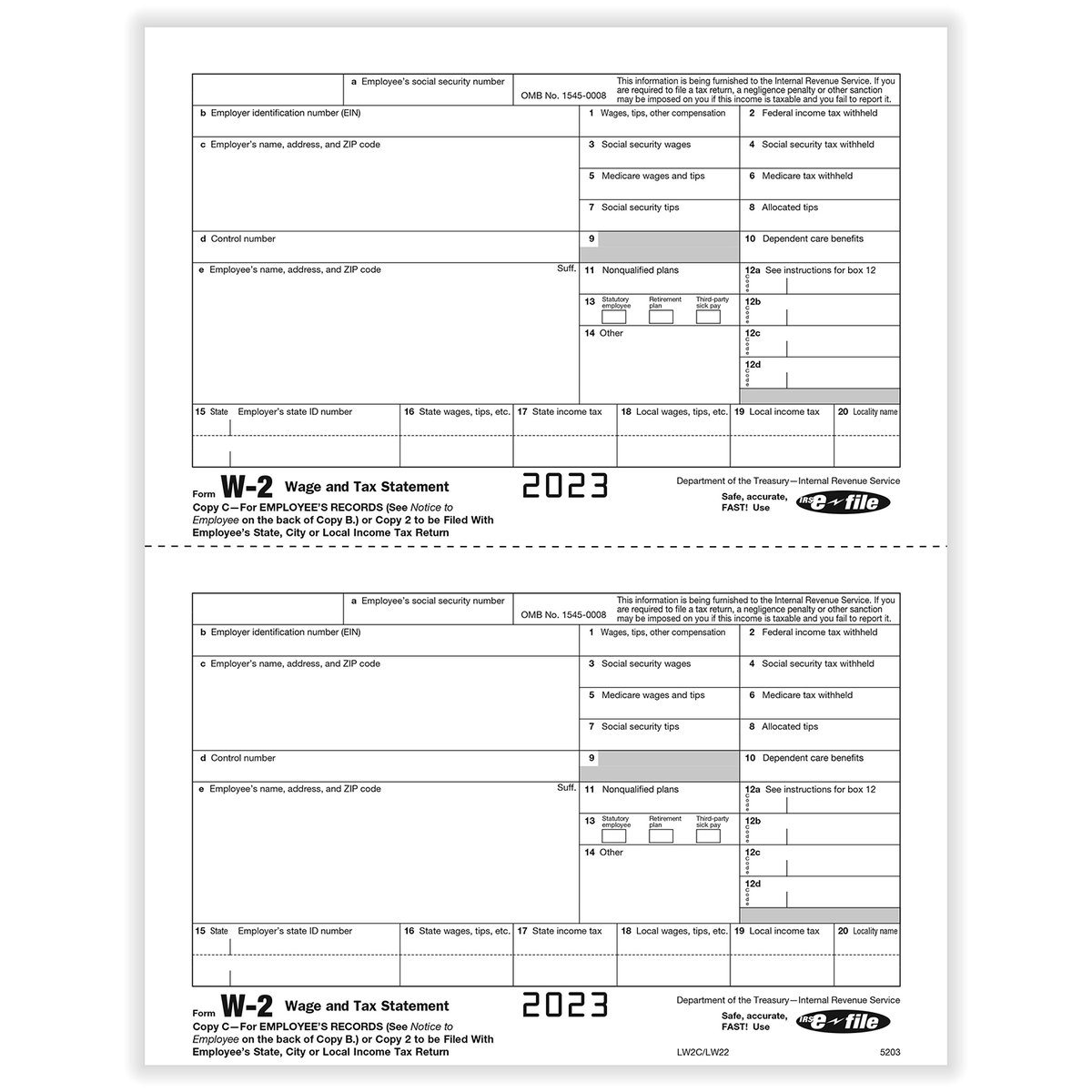
For many, the annual arrival of a thin envelope containing Form W-2 marks the official start of tax season. Far from being just another piece of mail, understanding W2 Forms and Requirements is crucial because this single document holds the key to accurately filing your federal, state, and local income taxes. It's not just about what you earned; it’s a detailed financial snapshot that tells the IRS (and you!) precisely how much you were paid and how much was withheld for taxes, retirement, and other benefits.
Navigating your W-2 might seem daunting with its numbered boxes and codes, but mastering this form is simpler than you think. Consider it your annual financial report card from your employer, an essential tool for ensuring a smooth tax filing experience and, ultimately, getting the refund you deserve or paying the correct amount.
At a Glance: Your W-2 Essentials
- What it is: A summary of your annual wages, tips, and other compensation, plus the federal, state, and local taxes your employer withheld.
- Who gets one: Every employee from whom income, Social Security, or Medicare tax was withheld, or if income tax would have been withheld based on your W-4, or if you earned $600 or more in the year.
- Who sends it: Your employer.
- When to expect it: By January 31st each year for the previous calendar year's earnings.
- Why it matters: You absolutely need it to file your income tax return (Form 1040) accurately.
- What if it's wrong or missing: Contact your employer immediately. If necessary, you can involve the IRS.
The Heart of Your Tax Return: What Exactly is a W-2?
Think of your Form W-2, officially called the "Wage and Tax Statement," as your employer's official declaration to both you and the government about your earnings and tax withholdings for a specific tax year. Every detail on it is important for your financial health and compliance.
Why the W-2 is Indispensable
This form isn't just a formality. It’s the foundational document for preparing your income tax return. Without it, you’d be guessing your income and the taxes you’ve already paid, which is a recipe for errors and potential trouble with tax authorities. The IRS and state tax departments use the W-2s submitted by employers to cross-reference the income you report on your tax return. This ensures consistency and helps prevent fraud.
Who Needs a W-2? The Employer's Obligation
So, who qualifies for a W-2? The rules are quite clear. According to the IRS, every employer engaged in a trade or business who pays remuneration for services performed by an employee must file a Form W-2 for each employee under these conditions:
- If they withheld any income, Social Security, or Medicare tax from the employee's pay.
- If income tax would have been withheld had the employee claimed no more than one withholding allowance or not claimed exemption from withholding on their Form W-4, Employee's Withholding Allowance Certificate.
- If they paid the employee $600 or more during the year, even if no taxes were withheld.
This applies to all employees, even if they're related to the employer. This definition clearly distinguishes employees from independent contractors.
W-2 vs. 1099: Knowing the Difference
It's common for people to confuse a W-2 with a Form 1099, but they serve fundamentally different purposes and signify different employment relationships.
- W-2 (Wage and Tax Statement): This form is for employees. If you work for an employer who dictates your hours, provides tools, and withholds taxes from your paycheck, you're an employee, and you'll receive a W-2. Your employer is responsible for withholding federal, state, Social Security, and Medicare taxes from your pay.
- 1099 (Various types, e.g., 1099-NEC for Nonemployee Compensation): This form is for independent contractors, freelancers, or self-employed individuals. If you work for a client who pays you for specific projects or services but doesn't withhold taxes, you're likely an independent contractor, and you'll receive a 1099 (typically a 1099-NEC if you earned $600 or more from that client). With a 1099, you are responsible for paying your own self-employment taxes (Social Security and Medicare) and estimated income taxes throughout the year.
This distinction is vital for understanding your tax obligations and whether you're handling your taxes correctly.
When & How to Get Your W-2: The Annual Pursuit
Your W-2 is like gold dust during tax season, so knowing when and how to get it is paramount. Employers have a strict deadline to ensure you have ample time to prepare your return.
The January 31st Deadline
By law, employers must mail or electronically deliver your W-2 to you by January 31st of the year following the tax year for which the wages were paid. For example, your W-2 for earnings in 2023 should arrive by January 31, 2024. This deadline gives you a full two months before the typical April 15th tax deadline, providing a comfortable window to prepare.
How Employers Deliver Your W-2
Historically, W-2s arrived via postal mail. While this is still a primary method, many employers now offer electronic access through their HR portals, payroll processors, or dedicated online platforms. If your employer provides online access, they must notify you and give you the option to opt-out and receive a paper copy instead.
What to Do If Your W-2 is Late or Missing
It's February, and your W-2 still hasn't shown up. Don't panic, but don't ignore it either. Here’s a step-by-step approach:
- Contact Your Employer: This is always the first step.
- Confirm they have your correct mailing address.
- Inquire if they've already sent it and when.
- Ask if they offer online access through a payroll portal. Many employers use third-party payroll services (like ADP or Paychex) that allow employees to download their W-2s directly.
- Request a duplicate copy.
- Contact the IRS: If you still haven't received your Form W-2 by the end of February, it's time to involve the IRS. They can help you by contacting your employer on your behalf. You'll need to provide:
- Your name, address, Social Security number.
- Your employer's name, address, and phone number.
- The dates you worked for them.
- An estimate of your wages and federal income tax withheld (this information can often be found on your last pay stub).
- File Your Return Anyway (with caution): Remember, your tax return is still due by the standard tax filing deadline, even if you don't have your W-2. If you're nearing the deadline without your W-2, you have a few options:
- Estimate and File Form 4852: You can use Form 4852, "Substitute for Form W-2, Wage and Tax Statement," to estimate your wages and withholdings based on your final pay stub or bank statements. However, filing with estimated figures can cause delays in processing your refund while the IRS tries to verify your information.
- File for an Extension: You can file for a tax extension using Form 4868, which gives you an additional six months to file your return (usually until October 15th). This extends the filing deadline, not the payment deadline. If you expect to owe taxes, you should still estimate and pay by the original deadline to avoid penalties and interest.
- Amend if W-2 Arrives Later: If your W-2 finally shows up after you've already filed using an estimate or Form 4852, and the figures are different, you'll need to amend your tax return with Form 1040-X.
Missing a W-2 can complicate things, but by staying proactive and knowing your options, you can navigate these challenges smoothly. Always keep an eye on those important tax filing deadlines to avoid last-minute stress.
Cracking the Code: A Box-by-Box Guide to Your W-2
Your W-2 is a grid of numbered boxes, each with its own story to tell about your income and taxes. Let's break down each one, so you can confidently use your W-2 to complete your Form 1040. While the physical layout can vary slightly between employers, the box numbers and their meanings are standard across the U.S.
The Essential Boxes: 1 Through 6
These are often the most referenced boxes, detailing your primary wages and federal tax withholdings.
- Box 1: Wages, Tips, Other Compensation.
- This is typically your gross taxable income for federal income tax purposes. It includes your base salary, wages, tips, bonuses, commissions, and other taxable fringe benefits.
- Important Note: This amount might be less than your gross pay shown on your last pay stub because pre-tax deductions (like 401(k) contributions, health insurance premiums, or dependent care benefits) are often excluded from this figure.
- How you use it: This is the critical number you’ll use to fill out Line 1a of your Form 1040. If you have multiple W-2s from different employers, you'll sum all Box 1 amounts and report the total on your 1040.
- Box 2: Federal Income Tax Withheld.
- This shows the total amount of federal income tax your employer withheld from your pay throughout the year and sent to the IRS on your behalf.
- Important Note: The amount withheld here is primarily determined by the information you provided on your Form W-4, Employee's Withholding Certificate. If you find yourself owing a lot of tax or getting a huge refund, you might need to consider adjusting your W-4 for the current year.
- How you use it: This amount is crucial for calculating your refund or tax due on your Form 1040, typically entered on Line 25a.
- Box 3: Social Security Wages.
- This indicates the total amount of your wages subject to Social Security tax. This figure might be different from Box 1.
- Important Note: There's an annual wage limit for Social Security taxes. For example, for 2024, the maximum amount of earnings subject to Social Security tax is $168,600. If you earned more than this, Box 3 will show $168,600, not your full earnings. There is no limit on Medicare wages.
- Box 4: Social Security Tax Withheld.
- This is the amount of Social Security tax your employer withheld from your pay. The Social Security tax rate is generally 6.2% of your Social Security wages (up to the annual limit).
- How you use it: This amount is part of your total tax payments on Form 1040.
- Box 5: Medicare Wages and Tips.
- This shows the total amount of your wages subject to Medicare tax. Unlike Social Security, there is no wage limit for Medicare tax; all your earned wages are subject to it. Therefore, this figure might be higher than Box 3, and often matches Box 1 if you have no pre-tax deductions that only apply to federal income tax (like certain retirement contributions).
- Box 6: Medicare Tax Withheld.
- This is the amount of Medicare tax your employer withheld. The Medicare tax rate is generally 1.45% of your Medicare wages. High-income earners may be subject to an additional 0.9% Medicare tax (known as the Additional Medicare Tax) on earnings above a certain threshold, but this additional tax is typically self-reported, not withheld by the employer.
- How you use it: This amount is also part of your total tax payments on Form 1040.
Other Important Boxes: 7 Through 19
These boxes provide more specific details about various types of compensation, benefits, and local/state taxes.
- Box 7: Social Security Tips.
- If you reported tip income to your employer, this box shows the amount of those tips subject to Social Security tax. These tips are already included in Box 1 and Box 3.
- Box 8: Allocated Tips.
- This box shows tips your employer allocated to you (meaning your employer determined you earned more tips than you reported to them). This amount is not included in Box 1, 3, 5, or 7, and you must add it to your wages on your tax return.
- Box 9: Verification Code.
- This box is rarely used and is generally left blank. When present, it's a verification code to help prevent fraud.
- Box 10: Dependent Care Benefits.
- This reports any amounts your employer paid for dependent care benefits (e.g., contributions to a dependent care flexible spending account or direct payments to a daycare provider). Any amount over $5,000 is also included in Box 1 as taxable income.
- Box 11: Nonqualified Plans.
- This box typically reports amounts distributed to you from your employer's nonqualified deferred compensation plans. These are compensation plans that do not meet ERISA (Employee Retirement Income Security Act) requirements.
- Box 12: Codes! (And Their Amounts).
- This is one of the more complex boxes, with up to four distinct sub-boxes (12a, 12b, 12c, 12d) used to report various types of compensation, benefits, or tax-deferred contributions using specific codes. Each code (a letter or two-letter combination) identifies a particular item, such as:
- D: Elective deferrals to a 401(k) plan.
- E: Elective deferrals to a 403(b) plan.
- F: Elective deferrals to a 457(b) plan.
- DD: Cost of employer-sponsored health coverage (for informational purposes, not taxable).
- W: Employer contributions to a Health Savings Account (HSA).
- There are many, many other codes. If you see a code you don't recognize, refer to the IRS instructions for Form W-2 for a complete list and explanation.
- Box 13: Checkboxes.
- This box contains three checkboxes that provide additional information:
- Statutory employee: Checked if you are a statutory employee (someone who performs services for a business but is treated as an independent contractor for federal income tax purposes and as an employee for Social Security and Medicare taxes).
- Retirement plan: Checked if you participated in your employer's retirement plan (e.g., 401(k), pension). This impacts your ability to deduct traditional IRA contributions.
- Third-party sick pay: Checked if you received sick pay from a third party (like an insurance company) that your employer has included in Box 1.
- Box 14: Other Information.
- This is a catch-all box where employers can report other tax-related information that doesn't fit into other specific boxes. This might include state disability insurance (SDI) taxes, union dues, health insurance premiums deducted, educational assistance payments, or nontaxable income. The employer will usually provide a description of the item next to the amount.
- Box 15: State (Employer's State ID No.).
- This box shows your employer's state abbreviation and state identification number. You might need this for your state tax return.
- Box 16: State Wages, Tips, etc.
- This reports the amount of your wages, tips, and other compensation subject to state income tax. This might be the same as Box 1 or different, depending on your state's tax laws and what pre-tax deductions are allowed at the state level.
- Box 17: State Income Tax.
- This is the total amount of state income tax withheld from your pay. You’ll use this to fill out your state income tax return.
- Box 18: Local Wages, Tips, etc.
- If you live or work in an area with local income taxes, this box shows the wages subject to those local taxes.
- Box 19: Local Income Tax.
- This is the total amount of local income tax withheld from your pay. You’ll use this for your local tax return.
Understanding each of these boxes is key to accurately completing your tax return. Remember, our W2 generator tool can help you visualize these fields and create a compliant W-2 if you're an employer, or understand the necessary inputs if you're an employee using tax software.
Decoding Box 12: The Alphabet Soup of Codes
Box 12 often presents the most confusion due to its cryptic codes. While it might look like a secret language, it's actually a standardized way for your employer to report specific types of income, deductions, and benefits that affect your tax situation but aren't covered by the main Boxes 1-6.
Each entry in Box 12 consists of a single or double letter code followed by a dollar amount. For instance, you might see "D 10000.00" or "DD 5000.00".
Why So Many Codes?
The IRS uses these codes to capture a wide range of financial activities that have particular tax treatments. These can include:
- Contributions to retirement plans: (e.g., D for 401(k), E for 403(b), F for 457(b)). These are typically pre-tax contributions that reduce your taxable income in Box 1.
- Health-related benefits: (e.g., W for Health Savings Account (HSA) contributions, DD for the cost of employer-sponsored health coverage). Code DD is particularly common; it reports the total cost of your health coverage for informational purposes and is generally not taxable income.
- Certain types of taxable income: (e.g., P for excludable moving expense reimbursements, Z for income from an NQDC plan subject to Section 409A).
- Nontaxable fringe benefits: (e.g., C for the cost of group-term life insurance over $50,000, which is taxable income included in Boxes 1, 3, and 5).
Where to Find the Full List
It's impractical to list all possible Box 12 codes here, as the IRS updates them annually. The most reliable place to find a comprehensive and current list of codes and their explanations is directly in the IRS instructions for Form W-2 and W-3. A quick online search for "IRS W-2 Box 12 codes" will lead you to the official documentation.
Key takeaway for Box 12: Don't guess. If you see a code you don't recognize, look it up. These codes inform your tax return software or tax preparer how to handle that specific amount, ensuring you claim the correct deductions or report the right income.
"Oops, My W-2 Has a Glitch!" What to Do About Errors
Finding an error on your W-2 can be frustrating, especially when you're eager to file your taxes. However, it's important to get it corrected, as discrepancies between your W-2 and your tax return can lead to delays or issues with the IRS.
Identifying the Error
First, carefully review your W-2 against your last pay stub of the year (or all pay stubs if you have them). Common errors can include:
- Incorrect name or Social Security number: This is critical and must be corrected immediately.
- Wrong address: Less critical for the IRS, but important for you to receive future documents.
- Incorrect wage amounts (Boxes 1, 3, 5, 16, 18): Check these against your pay stubs.
- Incorrect tax withheld amounts (Boxes 2, 4, 6, 17, 19): Again, cross-reference with your pay stubs.
- Mistakes in Box 12 codes or amounts: Ensure these match your records or expectations.
- Incorrect checkmarks in Box 13: For example, if you weren't in a retirement plan but the box is checked.
How to Get a Corrected W-2 (Form W-2c)
- Contact Your Employer: As soon as you discover an error, reach out to your employer's payroll or HR department. Clearly explain the mistake and provide any supporting documentation (like your pay stubs) that demonstrates the discrepancy.
- Request a Corrected W-2: Your employer is obligated to issue a corrected W-2, officially known as Form W-2c, Corrected Wage and Tax Statement. This form shows the previously reported incorrect figures and the new, corrected figures.
- Be Patient, But Persistent: Getting a W-2c can take time, as employers need to verify the information and go through their payroll processes. Follow up respectfully if you don't receive it within a reasonable timeframe.
The Employer's Responsibility and Potential Penalties
Employers are legally required to furnish accurate W-2s. If an error involves a dollar amount or a significant item like an address, the IRS may fine the employer for non-compliance. This isn't your concern as an employee, but it highlights the seriousness of accurate reporting.
What if You've Already Filed Your Taxes?
If you filed your tax return with the incorrect W-2 information and then receive a corrected W-2c, you will almost certainly need to amend your tax return. You do this by filing Form 1040-X, Amended U.S. Individual Income Tax Return. Don't worry; it's a common process. When you amend your tax return with Form 1040-X, you'll report the corrected figures and recalculate your tax liability. This could result in a different refund amount or additional taxes owed.
It's always better to wait for an accurate W-2 or W-2c before filing, if possible, to avoid the extra step of amending your return. However, if circumstances require you to file with imperfect information, know that there's a clear process to correct it.
Your W-2 and Your Tax Return: The Bigger Picture
Your W-2 isn't just a standalone document; it's a critical component that integrates directly with your overall tax picture. Understanding this connection can demystify the tax filing process and give you confidence that you're doing things right.
The Flow to Form 1040
When you sit down to prepare your federal income tax return, typically Form 1040, your W-2 is the first document you'll reach for. Here's a simplified look at how the information flows:
- Box 1 (Wages): Directly feeds into Line 1a of Form 1040.
- Box 2 (Federal Income Tax Withheld): Contributes to the total federal income tax payments reported on Line 25a of Form 1040.
- Other Boxes (Box 12 codes, Box 13 checkboxes): Inform other schedules or calculations on your Form 1040, such as deductions for IRA contributions, reporting of certain benefits, or additional income adjustments.
Tax software makes this process incredibly easy. You simply input the numbers from each box into the corresponding fields, and the software handles the calculations, ensuring your W-2 data is correctly transferred to your understanding your Form 1040 and any associated schedules.
Government Cross-Referencing: Why Accuracy Matters
The IRS and state tax authorities don't just take your word for it. Your employer sends copies of your W-2 (Copy A goes to the Social Security Administration, which then shares it with the IRS; Copy 1 goes to your state and local tax authorities). This means the government already has records of your income and withholdings before you even file your return.
When you file, the IRS's systems compare the income and withholding amounts you report on your Form 1040 against the W-2 data submitted by your employer.
- If they match: Your return is processed smoothly, and your refund (if any) is issued.
- If there are discrepancies: This can flag your return for review, leading to delays in processing your refund or potentially triggering an inquiry or audit from the IRS. This is why it's so important to ensure your W-2 is correct and that you accurately transcribe its information onto your tax return.
Think of your W-2 as the government's pre-filled cheat sheet about your earnings. When your numbers align with theirs, you're on the fast track to a successful tax season.
Common W-2 Questions & Quick Answers
It's natural to have questions when dealing with such an important financial document. Here are some quick answers to common W-2 queries:
What if I worked multiple jobs during the year?
You should receive a separate W-2 from every employer who paid you $600 or more (or withheld taxes) during the tax year. You'll need all of these W-2s to file your comprehensive tax return. Add up the Box 1 amounts from all your W-2s for your total federal taxable income, and sum all Box 2 amounts for your total federal tax withheld.
What if I earned less than $600 from an employer?
If your employer paid you less than $600 and did not withhold any federal, Social Security, or Medicare taxes, they are generally not required to issue you a W-2. However, you are still legally required to report that income on your tax return. Keep good records of these earnings, such as pay stubs or bank statements.
Can I get my W-2 online?
Many employers now offer electronic W-2s through payroll portals or dedicated HR platforms. You can typically download or print your W-2 directly from these sites. Your employer is required to notify you if this option is available and provide instructions for access. They also must provide you the option to opt out and receive a paper copy.
Do I need to attach my W-2 to my tax return?
If you are e-filing your tax return (which most people do), you do not need to physically attach your W-2. You simply input the information from your W-2 into the tax software. If you are mailing a paper return, you will typically attach Copy B and Copy C of your W-2 to your Form 1040. Always check the current year's IRS instructions for specific requirements.
What if my W-2 shows no federal or state tax withheld?
This could happen if your income was below the withholding threshold, or if you claimed "Exempt" on your Form W-4 (meaning you certified you had no tax liability last year and expect none this year). If you claimed "Exempt" but actually owe taxes, you'll be responsible for paying those taxes when you file, possibly with penalties if you didn't pay estimated taxes throughout the year. If this wasn't your intention, you should adjust your W-4 for the current tax year.
Final Steps: Beyond the W-2
You've received, understood, and successfully used your W-2 to file your taxes. But your responsibility doesn't end there. Taking a few proactive steps can save you headaches in the future and ensure you're always prepared.
Keep Meticulous Records
Once your taxes are filed, don't just toss your W-2. The IRS recommends keeping all tax records, including your W-2s, for at least three years from the date you filed your original return or two years from the date you paid the tax, whichever is later. Some experts suggest keeping them for even longer, especially if you have complex investments or self-employment income.
Store your W-2s in a safe, accessible place, whether it's a physical folder or a secure digital backup. These records are vital if you ever need to amend a return, apply for a loan, or deal with an IRS inquiry.
Double-Check Everything Before You File
Before hitting "submit" on your e-filed return or dropping your paper return in the mail, take a moment for one final review. Carefully compare the numbers you've entered into your tax software or written on your Form 1040 against your W-2s. Even a small typo can lead to big delays. Pay particular attention to:
- Social Security Numbers
- Wage amounts
- Withholding amounts
A few minutes of careful review can prevent weeks of waiting for a corrected refund or responding to an IRS letter.
Consider Professional Guidance
While this guide empowers you to understand your W-2, your overall tax situation might be more complex due to multiple income streams, investments, life changes (marriage, children, homeownership), or self-employment. If you're unsure about how all the pieces fit together or want to maximize your deductions and credits, consider consulting a qualified tax professional. They can offer personalized advice, ensure accuracy, and help you plan for future tax years.
Mastering your W-2 is a cornerstone of responsible financial management. With this comprehensive understanding, you're not just ready for tax season; you're empowered to confidently navigate your financial journey year after year.