Choosing the Best W2 Generator Software for Small Businesses: Your Definitive Guide
For small business owners, the annual W-2 scramble can feel like a high-stakes game. Missed deadlines, incorrect forms, or a simple typo can lead to hefty IRS penalties, eat into your time, and erode employee trust. That's why Choosing the Best W2 Generator Software isn't just about compliance; it's about protecting your bottom line and your peace of mind. This guide cuts through the complexity, offering seasoned advice on selecting a tool that fits your unique needs, ensuring accuracy, security, and a smoother tax season.
At a Glance: Key Takeaways
- Penalties are steep: Incorrect or late W-2s can cost $60 to $340 per form, with intentional disregard potentially costing $680+ per form.
- E-filing is mandatory for 10+ forms: Treasury Decision 9972 requires electronic filing for 10 or more combined W-2s, 1099s, and similar tax documents.
- Deadline is firm: February 2, 2026, for both employees and SSA. Extensions are rare and don't delay employee copies.
- Look for key features: User-friendliness, IRS compliance, e-filing, security, customer support, and W-2C correction workflows are non-negotiable.
- Integration is powerful: Connecting with your payroll or pay stub maker can save significant time and reduce errors.
- Free isn't always best: Free options can be basic and lack crucial features like e-filing or advanced validation.
- Your choice depends on your business: Consider your volume, existing systems, budget, and desired level of support.
Why Getting W-2s Right Matters: The High Stakes for Small Businesses
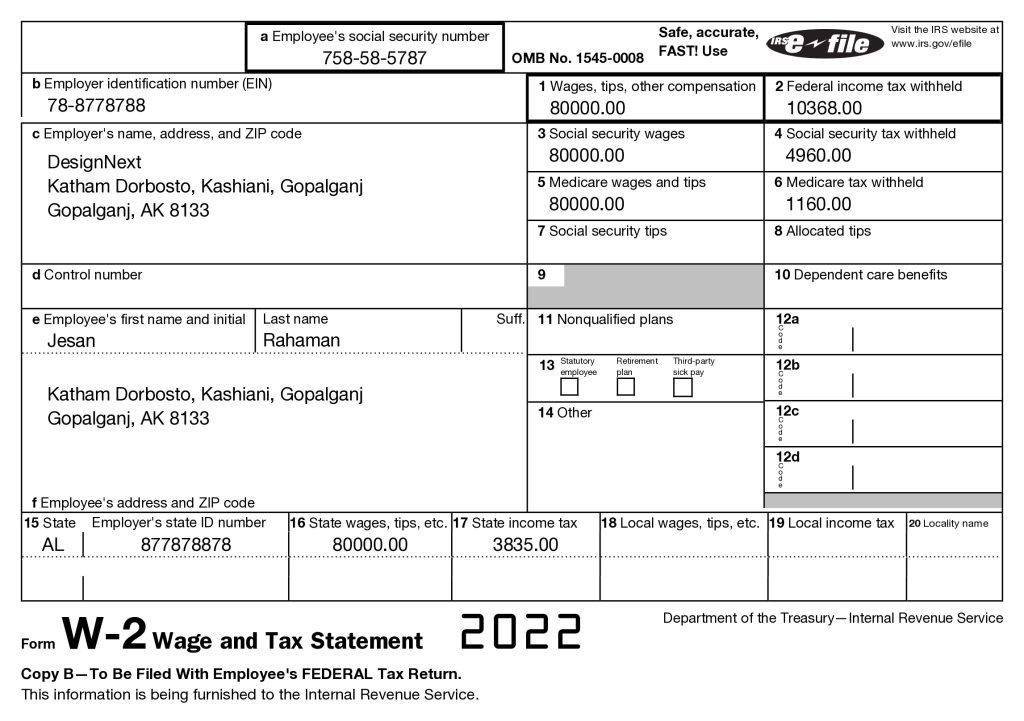
Every year, as an employer, you're responsible for summarizing employee wages, withheld taxes, and other critical information on Form W-2. These forms must reach your employees and the Social Security Administration (SSA) by the first business day of February (February 2, 2026, for the 2025 tax year, due to the weekend rule). This isn't just a formality; it's a critical compliance requirement with significant repercussions if mishandled.
The IRS means business when it comes to W-2 accuracy and timeliness. Penalties for incorrect or late W-2 submissions are substantial and have been on the rise, increasing by 15% for small businesses in 2024. For filings due in 2026, a simple oversight can cost you:
- $60 per form if corrected within 30 days of the deadline.
- $130 per form if corrected by August 1, 2026.
- $340 per form if corrected after August 1, 2026.
- At least $680+ per form in cases of intentional disregard.
These penalties can quickly add up, turning a minor administrative task into a major financial burden for a small business. Beyond the monetary cost, errors or delays can erode employee trust and lead to unnecessary stress during an already busy tax season.
Furthermore, the IRS is pushing for electronic filing. Treasury Decision 9972 mandates e-filing for employers who handle 10 or more combined W-2s, 1099s, or similar tax documents. This means if you have even a handful of employees and a few contractors, you'll likely need to e-file. A 30-day extension via Form 8809 for W-2s is notoriously difficult to get, requiring paper-filing and only being granted for "extraordinary circumstances" – and crucially, it never extends the deadline for distributing employee copies.
Given these strict rules and potential financial hits, relying on manual processes or outdated methods is simply too risky. Investing in reliable W-2 generator software is no longer a luxury; it's a necessity for any small business looking to streamline operations, ensure compliance, and avoid costly mistakes.
Decoding the Essentials: What Makes Great W-2 Software?
Before diving into specific platforms, let's establish a clear benchmark. The best W-2 generator software isn't just about printing forms; it’s about providing a comprehensive, secure, and intuitive solution that minimizes your effort and maximizes accuracy. Here are the essential features to prioritize:
User-Friendly Interface
You're a business owner, not a tax software expert. The ideal W-2 generator should be intuitive, requiring minimal training to navigate. Look for clear dashboards, step-by-step guides, and easy data input. If it feels like you need a degree in accounting to use it, keep looking.
Accuracy & Compliance
This is non-negotiable. The software must be up-to-date with the latest IRS regulations and constantly adapt to any changes. It should include built-in validation checks to flag common errors before submission, significantly reducing your risk of penalties.
Seamless Integration
Does your existing payroll system or pay stub maker "talk" to the W-2 software? The ability to import data directly from your current tools (like QuickBooks, Xero, or even simple CSV files) saves countless hours and eliminates manual data entry errors.
Cost-Effectiveness
While accuracy is paramount, your budget matters. Evaluate pricing models – per-form fees, monthly subscriptions, or tiered plans – and compare them against your filing volume. Some platforms offer free tiers for very small businesses, though these often come with functional limitations.
Rock-Solid Customer Support
When you hit a snag, you need reliable help, fast. Look for platforms with responsive customer support, ideally offering multiple channels (phone, email, chat) and clear documentation. Especially during peak tax season, accessible support can be a lifesaver.
Ironclad Security
You're handling sensitive employee data. The software must employ robust security measures like data encryption, secure servers (e.g., SOC 2 Type II, ISO 27001 certified), and multi-factor authentication to protect against breaches.
Effortless E-filing & State Support
Direct e-filing to the IRS/SSA is a must-have, especially with the 10-form mandate. Beyond federal filing, look for software that automates state-specific submissions, as many states require separate W-2 data. This significantly simplifies your compliance burden.
Guided W-2C Workflow for Corrections
Mistakes happen. A great W-2 generator will offer a clear, guided process for filing W-2C (corrected W-2) forms. This ensures that when an error does occur, you can rectify it quickly and accurately, further minimizing penalty risks.
Top Picks: Our Expert Review of W-2 Generator Software
With the essential features in mind, let's explore some of the leading W-2 generator software options available for small businesses, highlighting their strengths and ideal use cases.
Paystubmaker.com: The All-in-One for Small Businesses
For businesses that want a truly integrated solution, Paystubmaker.com stands out. It offers automatic W-2 generation that integrates seamlessly with their existing pay stub maker, providing an end-to-end payroll solution. This kind of integration is exactly what drives efficiency; for instance, Gusto, a leader in integrated payroll, reported 95% customer satisfaction with its W-2 feature. If you're already generating pay stubs and want your W-2s to flow naturally from that data, this platform is a strong contender.
Stubcheck.com: Budget-Friendly with a Free Tier
Stubcheck.com aims to simplify payroll with automatic calculation of wages, taxes, and deductions. What makes it particularly attractive for micro-businesses is its free W-2 form creator for those with under 10 employees. For growing businesses, pricing starts at $45/month plus $4/employee. This platform has a strong track record, successfully filing over one million small businesses' W-2s in 2024. It also integrates with Stubcheck's own accounting software, offering another layer of data synchronization.
Tax1099 (Zenwork’s): Powerhouse for Complex Needs
Part of the Zenwork suite, Tax1099 is a robust and flexible platform designed for businesses of all sizes, including those with more intricate filing requirements. It supports various data import methods, including Excel, QuickBooks, Xero uploads, SFTP, and API options. Tax1099 handles federal filings to the SSA and automatically generates XML packages for states, simplifying multi-state compliance. Its advanced features include early-format checks, data validation, USPS address verification, and duplicate flagging – all crucial for accuracy. For added security and convenience, it offers secure portals for employees to access forms, print-and-mail services, and guided W-2C workflows. With SOC 2 Type II and ISO 27001 certifications, your data security is a top priority.
ADP SmartCompliance: The Natural Extension for ADP Users
If your business is already entrenched in the ADP ecosystem for payroll, ADP SmartCompliance is a logical and seamless choice. It integrates directly with your existing payroll data, allowing for one-click filing to the SSA and participating states. Employees can conveniently access their W-2 forms via their ADP portal, reducing inquiries to your HR team. This solution is best suited for mid-to-large employers who are already leveraging ADP for their payroll needs, providing a truly unified experience.
Paychex Flex E-File Center: Streamlined for Mid-Sized Paychex Clients
Similar to ADP SmartCompliance, Paychex Flex E-File Center is an excellent option for mid-sized companies currently using Paychex for payroll. It effortlessly pulls data from your existing Paychex system but also allows for spreadsheet uploads if needed. The platform features clear on-screen error alerts to help you catch mistakes before submission. Paychex offers comprehensive print-and-mail options and provides extended customer support during the critical January filing period, ensuring you have help when you need it most.
Yearli by Greatland: Scalable for Accounting Pros
Yearli by Greatland offers a scalable solution with three distinct tiers: basic e-filing, enhanced validations and state feeds, and API access with longer data retention. It's highly flexible with data imports, accepting files from QuickBooks, Peachtree, Sage, and various EDI formats. Yearli can even offer same-day print-and-mail services for those last-minute needs. Its robust features make it a favorite among accounting firms and service providers who manage multiple W-2s for various clients.
TaxBandits: Multi-Entity Management Made Easy
TaxBandits shines for businesses or payroll bureaus managing multiple entities (EINs) from a single dashboard. It supports common import methods like Excel, QuickBooks, and SFTP uploads. A key strength is its built-in W-2C workflow, streamlining corrections, and its ability to file Form 8809 extensions. It also provides white-label print-and-mail services, allowing you to brand the envelopes. Robust access control with activity logs adds an extra layer of security and oversight, making it ideal for those with complex organizational structures.
Track1099 (Avalara): Tech-Savvy & API-Driven
For payroll teams comfortable with technology and automation, Track1099, an Avalara product, offers significant advantages. It boasts generous API quotas and robust automation capabilities. Integrations are available with popular accounting platforms like QuickBooks, Xero, NetSuite, and Bill.com, and it accepts CSV uploads. Real-time format checks help catch errors immediately. A critical note: W-2 state filing is limited, with only Oregon currently supported for W-2s. Pricing starts around $3/form, scaling with volume. While powerful, be prepared for potential manual steps for state filings if you operate outside of supported states, making it best for tech-savvy teams.
WageFiling.com: Simple & Quick for Low Volume
For the smallest organizations or those filing only a few W-2s, WageFiling.com offers a straightforward, no-frills solution. It supports CSV upload or manual data entry, without requiring any software installs. You can submit directly to the SSA on the same day and opt for print-and-mail services. However, it lacks advanced features like API access and deep validation checks, making it less suitable for higher volumes or complex needs. It's priced per form, without subscription fees, offering a pay-as-you-go model.
Free W-2 Generators: Are They Worth the Savings?
The allure of "free" is always strong, especially for small businesses watching their budget. Free W-2 generator options exist, but they come with trade-offs you need to understand.
Advantages:
- Cost Savings: The most obvious benefit is avoiding direct expenses, which can be significant for micro-businesses with only a handful of employees.
- Basic Essential Features: Many free tools can accurately generate and print federal W-2 forms (Copy B, C, and 2 for employees), and often Copy A for the SSA.
Drawbacks:
- Limited Functionality: Free versions often lack advanced features like direct e-filing to the SSA (which is mandatory for 10+ forms), state-specific e-filing, integration with payroll software, or guided correction workflows (W-2C).
- Higher Risk of Errors: Without robust data validation, address verification, or duplicate flagging, the risk of manual errors is higher compared to sophisticated paid options.
- No Customer Support: Free tools rarely offer dedicated customer support, leaving you to troubleshoot issues independently.
- Data Security Concerns: While many free tools are reputable, always verify their security measures, as less robust platforms might pose higher data security risks.
Popular Free Options:
- IRS Free File: Offers free tax preparation and e-filing options, typically for taxpayers meeting specific income thresholds. Some partners may offer W-2 related services for free.
- eFile4Biz: Provides a basic free W-2 form creator, often with optional paid upgrades for e-filing, print-and-mail, or advanced features.
While free options can be a starting point for businesses with very low volume and simple needs, the risks associated with non-compliance often outweigh the cost savings. For most small businesses, a reliable paid solution offers far greater value and peace of mind.
The Power of Integration: Why Your W-2 Generator Should Talk to Your Pay Stub Maker
Imagine inputting employee data once, and having it automatically populate pay stubs throughout the year and then perfectly generate W-2s at year-end. This isn't a pipe dream; it's the reality with integrated solutions. The synergy between your W-2 form generator and your pay stub maker is a game-changer for payroll efficiency and accuracy.
A 2024 case study by the National Small Business Association (NSBA) highlighted the tangible benefits. Businesses using integrated tools reduced their payroll processing time by an average of 30% and saw a 25% decrease in errors. For instance, Green Valley Landscaping, a small business with 15 employees, saved 12 hours during tax time and avoided $1,200 in potential penalties after switching to a platform that unified W-2 and pay stub generation. This holistic approach helps streamline your entire payroll process. If you want to dive deeper into managing employee compensation throughout the year, explore our comprehensive guide to small business payroll.
Making Your Choice: A Smart Decision Framework
With so many options available, how do you pinpoint the perfect W-2 generator software for your business? It comes down to aligning the software's capabilities with your specific operational reality.
Your Business Size & Volume
- Micro-businesses (1-9 W-2s): A free tier or a simple, per-form solution like Stubcheck.com (free under 10 employees) or WageFiling.com might suffice if your needs are basic and you don't mind some manual effort for state filings.
- Small Businesses (10-50 W-2s): You'll need reliable e-filing for federal and ideally state, strong validation, and good support. Platforms like Paystubmaker.com, Stubcheck.com, or the more robust Tax1099 offer excellent value.
- Growing or Mid-Sized Businesses (50+ W-2s) / Multiple EINs: Look for comprehensive features like W-2C workflows, robust integrations, and advanced data validation. Tax1099, Yearli, and TaxBandits are designed for this scale. If you're already on ADP or Paychex, their integrated solutions are tailored for you.
Existing Payroll Ecosystem
This is crucial. If you're already using a specific payroll or accounting software (QuickBooks, Xero, ADP, Paychex), prioritizing a W-2 generator that seamlessly integrates with it will save you immense headaches. Data import capabilities (CSV, Excel, API) are key here.
Budget & Pricing Model
- Per-Form Pricing: Good for very low volume or seasonal needs (e.g., WageFiling.com, Track1099).
- Subscription (Monthly/Annual): Offers predictable costs, often includes unlimited forms or tiered pricing, and typically comes with more features and support (e.g., Stubcheck.com, Tax1099).
- Tiered Plans: Provides flexibility to scale services as your business grows (e.g., Yearli).
Complexity of Your Needs
- Simple W-2s, one state: A basic solution might be enough.
- Multiple states, complex deductions, W-2Cs: You need a feature-rich platform with robust validation, state-specific e-filing, and clear correction workflows. Tax1099, Yearli, and TaxBandits are strong here.
- Tech-savvy team, automation focus: Track1099's API capabilities could be a great fit, provided you manage its state filing limitations.
Customer Support Expectations
Do you prefer self-service, or do you need readily available phone/chat support during crunch time? Platforms like Paychex Flex E-File Center offer extended support, while free options generally offer none.
Choosing the right W-2 generator software is a strategic decision that impacts your financial health and operational efficiency. For a broader perspective on managing all your payment processes, consider reading our guide to choosing the right overall payroll software.
Common Questions & Clarity: Demystifying W-2 Filing
Let's clear up some frequently asked questions that often trip up small business owners during W-2 season.
What's the '10-form e-filing threshold' really mean?
This often misunderstood rule, stemming from Treasury Decision 9972, means that if you file 10 or more combined W-2s, 1099s, or similar information returns, you must e-file them. It’s not 10 of each form type; it's the total count. This makes e-filing mandatory for a significant number of small businesses. For a deeper dive into the specifics, check out our resource on understanding the intricacies of W-2 forms.
Which software handles W-2C corrections?
Many top-tier platforms recognize the importance of correcting errors. Tax1099, TaxBandits, Yearli Premier, and ADP SmartCompliance all include guided correction workflows for W-2C amendments, simplifying what can otherwise be a confusing process.
Does the SSA forward W-2s to states?
No, the Social Security Administration (SSA) forwards your W-2/W-3 data to the IRS, but generally not directly to state agencies. Most states require a separate submission, often using the EFW2 format. Quality W-2 software can automate this state-specific submission, but you should always verify your specific state's requirements.
Can I manage multiple EINs with this software?
Yes, most reviewed platforms understand that businesses, especially those working with clients or with complex structures, might need to manage multiple Employer Identification Numbers (EINs). TaxBandits, Yearli, and Tax1099, in particular, are designed with multi-entity operations in mind, allowing you to manage various EINs within a single user account.
What about late employee copies?
The penalty structure for late employee copies (Copy B, C, and 2) is the same as for late SSA filings. If you don't provide employees with their W-2s by the February 2nd deadline, your business faces the same $60 to $340+ per form penalties. Providing employees with their forms accurately and on time is just as crucial as submitting to the SSA. Learning strategies for avoiding common IRS penalties across all tax forms can save you significantly.
Does Form 8809 delay employee copies?
No. While Form 8809 is used to request a 30-day extension for filing W-2s with the SSA (and is only granted for extraordinary circumstances), it does not extend the deadline for providing W-2 copies to your employees. Employee copies are still due by the original February 2nd deadline.
Your Next Steps to Stress-Free W-2s
Choosing the right W-2 generator software is one of the smartest investments you can make for your small business. It’s not just about avoiding penalties; it’s about freeing up your valuable time, ensuring data accuracy, and maintaining compliance with confidence.
Take the insights from this guide and apply them to your specific business needs. Consider your volume of W-2s, the complexity of your payroll, your existing software ecosystem, and your budget. Don't be afraid to try out free trials where available.
By investing in a reliable W-2 form generator, you're not just buying software; you're buying peace of mind, allowing you to focus on what you do best: growing your business. Get started today and Generate your W2s with confidence. And remember, W-2s are just one piece of the puzzle; make sure you're also prepared for navigating 1099 filing requirements if you work with contractors.